

Are Photo Vault Apps Safe? How to Tell a Real Vault From a Hiding Place
A vault app asks for your most private photos. Many deserve that trust; some don’t. You can’t see inside the code, but you can ask the right questions. Here are eight of them.
The App Store has hundreds of apps that promise to lock away your photos. Their screens look similar: a keypad, some albums, maybe a fake calculator. What happens underneath can be very different.
Some apps encrypt each photo so that, without your key, the file is noise. Others move photos into a private folder and put a PIN screen in front of it. Both stop a friend from scrolling. Only one stops someone who gets at the files themselves. These eight checks help you tell which kind you are looking at.
A vault that answers every check below: Vaultmira
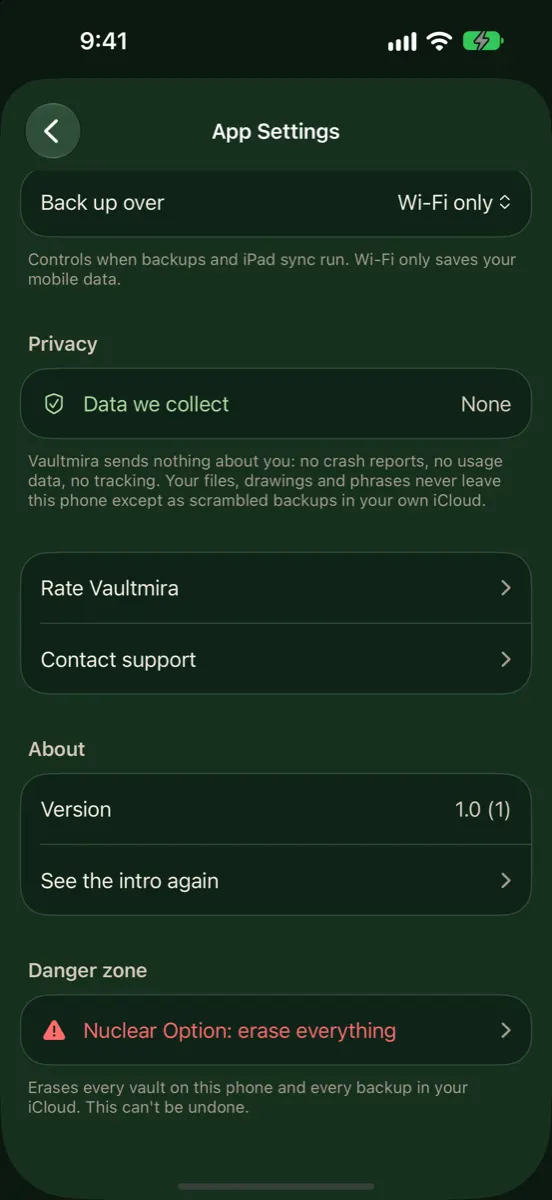
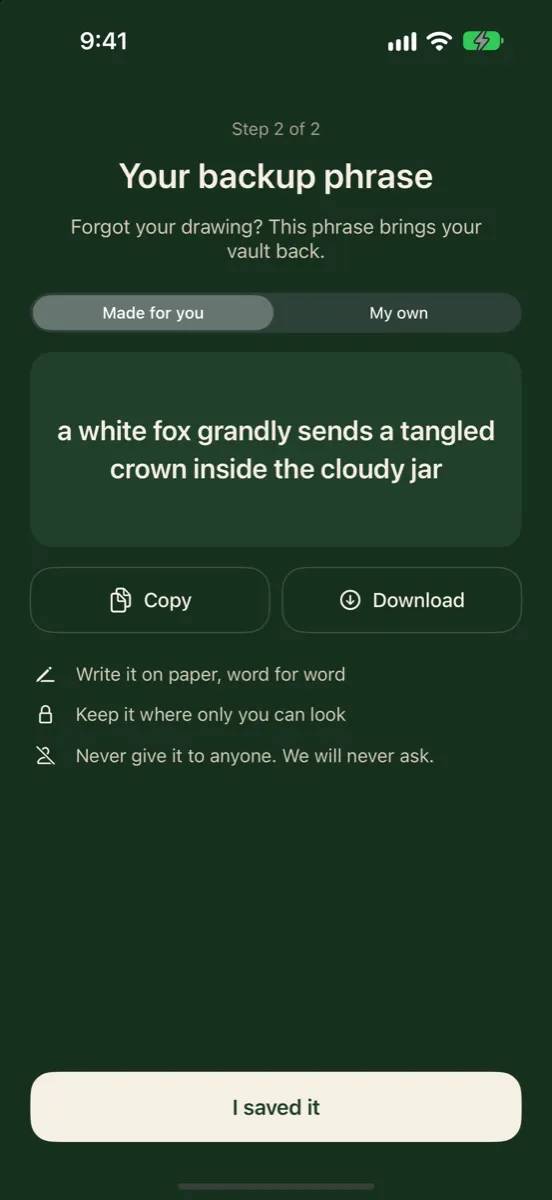
Vaultmira states its design in plain words: PBKDF2-HMAC-SHA256 with 600,000 rounds turns your drawing into a key, a random master key seals every file with AES-256-GCM, there is no account, no analytics and no Vaultmira server for your files, and a backup phrase is the only way back in. We think every vault should be this open about how it works.
How it looks in Vaultmira
First: What Are You Protecting Against?
“Safe” depends on the threat. Most people worry about three things, in this order:
- Someone with your unlocked phone: a partner, child, friend or coworker who knows your passcode or picks up the phone while it’s open.
- Losing the phone, or the app, and with it the photos.
- Someone copying the data: from the phone with special tools, from a backup, or from the app maker’s servers.
A good vault handles all three. A weak one handles only the first, and sometimes makes the second worse.
The Eight Checks
1. Does it actually encrypt each file?
Look for a clear statement that photos and videos are encrypted on the device, ideally naming the method, such as AES-256. Be cautious if the app only talks about a “lock”, a “PIN” or “military-grade security” with no details. A PIN screen in front of normal files is a door, not a safe.
2. What is the key made from?
Encryption is only as strong as its key. A 4-digit PIN has 10,000 possible values; a computer can try them all quickly if the files are ever copied off the phone. Stronger apps stretch whatever you enter with a slow function such as PBKDF2, so each guess costs real time. Vaultmira, for example, runs your drawing through PBKDF2-HMAC-SHA256 for 600,000 rounds, the figure the OWASP Password Storage Cheat Sheet recommends for that function.
3. Is your passcode the key?
If the vault opens with your iPhone passcode or Face ID alone, anyone who can unlock your phone can open the vault. That may be fine for you. If it isn’t, choose an app whose key is separate.
4. How does “forgot password” work?
This tells you a lot. If an email or support ticket can get you back in, ask what that reset actually unlocks, and read the maker’s explanation. If there is no reset at all, look for a recovery key you hold yourself, such as a phrase. Vaultmira gives every vault a backup phrase; we have no reset button, because a reset we could press would be a way in for someone else too.
5. Where does the backup go, and is it sealed first?
A vault without a backup puts your photos at risk of being lost with the phone. A backup that uploads readable copies puts them at risk elsewhere. Look for files encrypted on your phone before upload, and for clarity about whose servers hold them. Vaultmira’s Encrypted iCloud Backup uploads already-sealed files to your own private iCloud; there is no Vaultmira server.
6. What does the privacy label say?
Every App Store listing has an App Privacy section, which the developer fills in, as Apple explains in its privacy details guidance. Look for “Data Used to Track You” and “Data Linked to You”. A vault that shows ads or tracks usage isn’t automatically unsafe for your photos, but you should know.
7. Can you get your files out?
You should never be trapped. Check that you can save or share files back out, and how many at once; moving hundreds of files one by one is slow. In Vaultmira, open a file and tap Share a copy to save it to Photos, Files or another app. Today that works one file at a time.
8. Is it maintained and clear about its limits?
Look at the version history and the date of the last update. Then read the maker’s own explanation of what the app does not protect against. Honest limits are a good sign.
The Checklist in One Table
| Question | Good sign | Warning sign |
|---|---|---|
| Encryption | Named method, every file and preview | Only a lock screen; vague wording |
| Key | Stretched (PBKDF2 or similar), separate from passcode | Short PIN, or passcode only |
| Recovery | A key or phrase you hold | Unclear what a reset unlocks |
| Backup | Sealed on your phone before upload | No backup, or readable uploads |
| Privacy label | Little or no data collected | Tracking data you didn’t expect |
| Export | Clear way to get files out | No way to get files out |
| Upkeep | Recent updates, clear documentation | Long silence, no explanations |
A Five-Minute Test Before You Trust Any Vault
- Add three photos and one video, then lock the app and open it again.
- Export one file and check it opens normally outside the app.
- Turn on the backup and wait until the app says it has finished.
- Read the App Privacy section of the listing.
- Only then remove the originals from Photos and from Recently Deleted.
What No Vault Can Do
Even the best-built vault has limits, and it is safer to know them:
- It can’t protect a key someone has seen. If someone watches you draw or type, they have it. In Vaultmira you can turn off Show my drawing as I draw to make that harder.
- It can’t reach copies elsewhere. Originals in Photos, Recently Deleted, chats or other cloud apps stay there until you delete them.
- It can’t fix a compromised phone. Keep iOS updated, use a strong passcode, and consider Apple’s Stolen Device Protection.
- It is not a safety plan. If you are in danger, an app is not enough. Read Keeping evidence safe in an unsafe relationship.
How Vaultmira Answers the Eight Checks
- Encryption: each file, its preview, the file list and the backup phrase are sealed with AES-256-GCM under a random master key.
- Key: a drawing on a 5×5 grid (at least 6 dots and a turn), stretched with PBKDF2-HMAC-SHA256, 600,000 rounds, plus a salt.
- Separate from your passcode: Face ID and your iPhone code don’t open a vault.
- Recovery: a backup phrase, 9 random words made for you or 6+ words of your own.
- Backup: free, on by default, sealed before it leaves the phone, stored in your private iCloud.
- Privacy: no account, no email, no analytics.
- Export: Share a copy from any open file, one file at a time.
- Limits, stated: anyone who learns your drawing can open that vault; someone who copies the app’s files off an unlocked phone with special tools could count vault folders, but can’t open them.
The full design is on our Security Architecture page, and How photo vault apps work explains the ideas in plain words.
Frequently Asked Questions
Can photo vault apps see my photos?
It depends on the app. If photos are encrypted on your phone with a key the company never receives, the company can’t read them. If photos are uploaded in readable form, or the company keeps keys, it could. Read the maker’s explanation of its backup.
Are free vault apps safe?
Price doesn’t decide safety; design does. Many free plans are fine. Check the eight points above, especially encryption, recovery and the privacy label, which shows whether ads or tracking pay for the app.
Is a calculator vault safe?
The calculator look is a disguise, not protection. What matters is whether the files behind it are encrypted with a strong key. Our guide Calculator vault apps covers this.
What happens to my photos if the vault app stops being updated?
They stay on your phone for as long as the app still runs, but a future iOS change could break an old app. That is why export matters: if a vault looks abandoned, move your files out while you can.
Does Vaultmira collect any data?
Vaultmira has no account, no email sign-up and no analytics, and there is no Vaultmira server for your files. Purchases go through Apple, and backups go to your own private iCloud, already sealed.
Related reading:
Keep it private, for real
Hidden is not the same as locked. Vaultmira seals your photos and files on your iPhone behind a shape only you know.
Download Vaultmira Free