

Are Hidden Photos Saved to iCloud?
Hiding a photo changes where it shows up on your screen. It does not change where it is stored. Here is what that means for iCloud, and what to do if a photo should stay off Apple’s servers in readable form.
Many people hide a photo and assume it has gone somewhere safer. It hasn’t moved at all. The photo is still in your library, still the same file, and still part of whatever backup or sync your iPhone already uses. Apple’s own help pages say that if you use iCloud Photos, a photo you hide on one device is hidden on your other devices too, which only works because the photo and its “hidden” label both live in iCloud.
That is not a flaw. The Hidden album was made to keep pictures out of the main grid, Memories and widgets, and it does that well. It just answers a different question from “where is this file, and who could read it?” This guide answers that second question.
For photos only you can open: Vaultmira
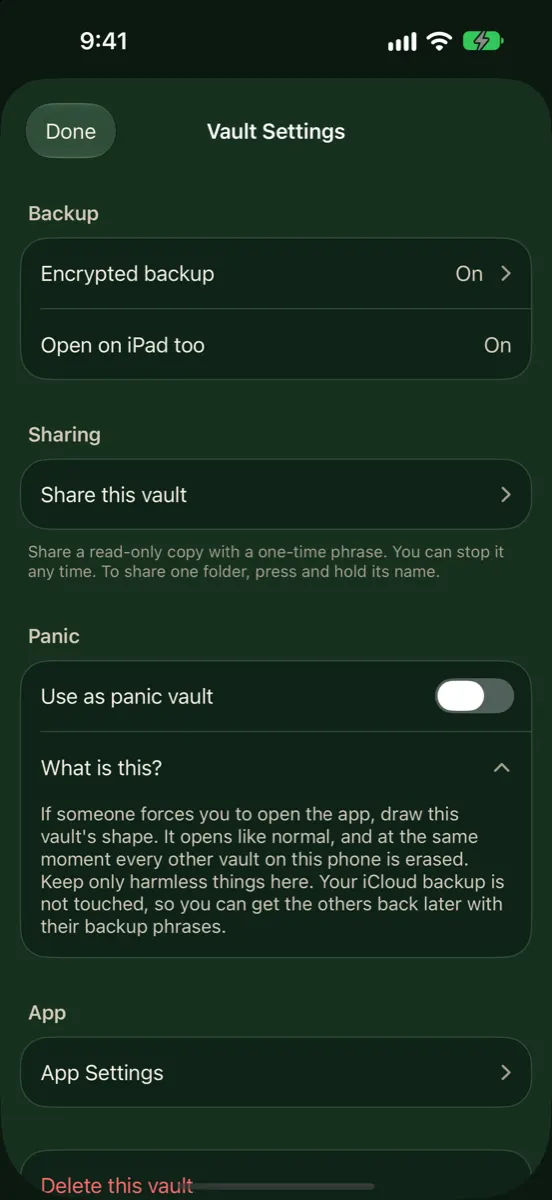
Vaultmira takes a photo out of the Photos library and seals it on your iPhone with AES-256-GCM before anything is saved. Its free encrypted iCloud backup uploads only those sealed files to your own private iCloud, so Apple stores scrambled data it cannot open. No account, no email, no Vaultmira server. Get Vaultmira on the App Store.
How it looks in Vaultmira
What “Hidden” Actually Changes
When you tap Hide, Photos moves the picture into the Hidden collection. Apple says hidden items then stop appearing anywhere else in Photos, such as the Library, other albums or the Photos widget on your Home Screen. The Hidden and Recently Deleted collections are locked by default and open with Face ID, Touch ID or your passcode.
What does not change is just as important. The file is the same size, in the same format, with the same details inside it (date, camera, and the place it was taken if location was on). It is not copied to a special encrypted area, and nothing new is needed to open it except the same unlock that opens your iPhone.
| Changes when you hide | Stays the same | |
|---|---|---|
| Where you see it | Only in the Hidden collection | — |
| Lock | Face ID, Touch ID or passcode to view the collection | Same unlock as your iPhone |
| The file | — | Same photo, same details, same storage |
| iCloud Photos | Hidden on every device | Still synced to iCloud |
| Encryption | — | Whatever your iCloud setting already uses |
With iCloud Photos On
iCloud Photos keeps one library across your iPhone, iPad, Mac and iCloud.com. A hidden photo is part of that library, so it is uploaded like any other. iCloud.com even has its own Hidden album and lets you hide and unhide photos there after signing in to your Apple Account. Deleting works the same way: Apple keeps deleted items in Recently Deleted for 30 days, then removes them from your iPhone, iCloud and other devices.
If you use a Shared Library
Apple notes that hiding a photo that is in an iCloud Shared Photo Library moves it to the Hidden album for every participant, where they can view it or unhide it. If a photo is meant for you alone, keep it in your personal library, or out of Photos entirely.
With iCloud Photos Off
If you don’t use iCloud Photos, hidden photos stay on the device. But they may still reach iCloud another way. Apple’s page on what iCloud backs up says that when iCloud Photos is off, iCloud Backup may include the photos and videos in your library. A backup made with a Mac or PC can contain them too. So turning off iCloud Photos alone does not mean “never in the cloud.”
Who Holds the Key to Your iCloud Photos?
Apple encrypts iCloud data in transit and on its servers. The question is who holds the key. Apple describes two settings:
- Standard data protection (the default). Your data is encrypted and the keys are kept in Apple’s data centers, so Apple can help you recover your data. Photos and iCloud Backup are in this group.
- Advanced Data Protection (optional). Photos, iCloud Backup, iCloud Drive, Notes and more become end-to-end encrypted, so only your trusted devices hold the keys. You must set up a Recovery Contact or a Recovery Key first, because Apple can no longer help you get the data back.
Even with Advanced Data Protection on, Apple says some metadata stays under standard protection, such as dates when items changed and checksums of photo data used to save storage. Shared Albums in Photos and “anyone with the link” sharing do not support Advanced Data Protection.
Apple also says it can no longer offer Advanced Data Protection to new users in the United Kingdom. Check the setting is actually available and turned on before you rely on it.
Apple’s published legal process guidelines say iCloud content may be provided in response to a valid search warrant, and that with Advanced Data Protection on, Apple cannot decrypt certain content including Photos and Backup. In short: the Hidden album has no effect on any of this. Your iCloud setting does.
How to Keep a Photo Out of iCloud
You have three honest options, depending on what you want:
- Turn on Advanced Data Protection. Your whole Photos library becomes end-to-end encrypted in iCloud. It protects against a breach at the cloud end, but anyone who can unlock your iPhone can still open the Hidden album.
- Turn off iCloud Photos. Photos stop syncing, but check whether iCloud Backup or a computer backup now carries them instead, and remember a lost phone takes them with it.
- Move the photo into an app that encrypts it on the phone. Then remove the original from Photos and empty Recently Deleted. Whatever reaches iCloud is already sealed.
How Vaultmira Handles iCloud
Vaultmira takes the third route. When you add a photo, it is sealed with AES-256-GCM using a random master key that only your drawing or your backup phrase can unlock. Its preview, the vault’s file list and folder names are sealed too. The photo is no longer part of your Photos library, so iCloud Photos never sees it.
- Encrypted iCloud backup is free and on by default. It uploads already-sealed files to your own private iCloud, under random names. By default it waits for Wi-Fi and keeps 3 versions (you can pick 1, 3, 5 or 10). See Encrypted iCloud Backup.
- Remove the original. After importing from Photos, Vaultmira offers Remove from Photos; iOS asks you to confirm. The original then waits in Photos’ Recently Deleted for 30 days unless you empty it.
- Skip Photos entirely. The Secure Camera takes photos and videos straight into the vault, never into your gallery.
One honest limit: if you switch backup off for a vault, that vault lives only on that device. If the phone is lost, it cannot come back. And if you forget both your drawing and your backup phrase, nobody can open the backup, including us.
A Quick Checklist
- Check whether iCloud Photos is on: Settings → your name → iCloud → Photos.
- Decide whether Advanced Data Protection is right for you, and set up a Recovery Contact or Key first.
- Keep private photos out of any Shared Library.
- For photos that should be readable only by you, move them into an encrypted vault, then remove the originals and empty Recently Deleted.
Frequently Asked Questions
Do hidden photos count toward my iCloud storage?
Yes. With iCloud Photos on they are part of your library in iCloud, so they use storage like any other photo.
If I hide a photo on my iPhone, is it hidden on my iPad and Mac?
Yes, if iCloud Photos is on. Apple says photos you hide on one device are hidden on your other devices too.
Can Apple see my hidden photos?
Hiding makes no difference to Apple’s access. Under standard data protection Apple holds the keys to iCloud Photos. With Advanced Data Protection on, Photos are end-to-end encrypted and Apple says it cannot decrypt them. See Can Apple see your photos?
Does Vaultmira’s backup use iCloud Photos?
No. Vaultmira stores sealed files in its own area of your private iCloud, not in your photo library. They never appear in Photos or on iCloud.com/photos.
If I unhide a photo, does it upload again?
No new upload is needed. With iCloud Photos on, it was in iCloud the whole time; unhiding just shows it in your library again.
Related reading:
- Can Apple See Your Photos?
- Do Hidden Photos Move to a New iPhone?
- AES-256 Encryption Explained Simply
Keep it private, for real
Hidden is not the same as locked. Vaultmira seals your photos and files on your iPhone behind a shape only you know.
Download Vaultmira Free