

Do Hidden Photos Move to a New iPhone?
Getting a new iPhone is exciting until you wonder whether your private pictures made the trip, or whether they came along when you didn’t expect them to. Here is what happens to hidden photos with each transfer method, and how to move an encrypted vault.
Apple gives you several ways to move to a new iPhone: Quick Start straight from your old phone, a cable between two iPhones, or restoring from an iCloud or computer backup. iCloud Photos also fills your library on its own once you sign in.
The Hidden album rides along with all of them, because hiding a photo doesn’t remove it from your library. That is usually what you want. But it also means the new phone, and anyone who can unlock it, has those photos too. Below is what each method carries and what to check afterwards.
For private photos that move safely: Vaultmira
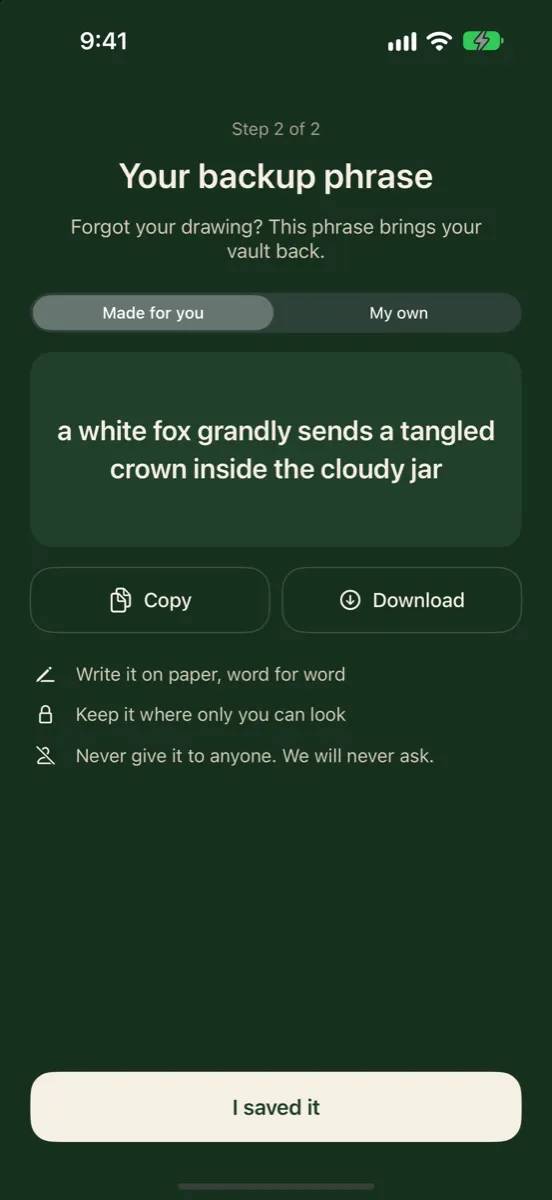
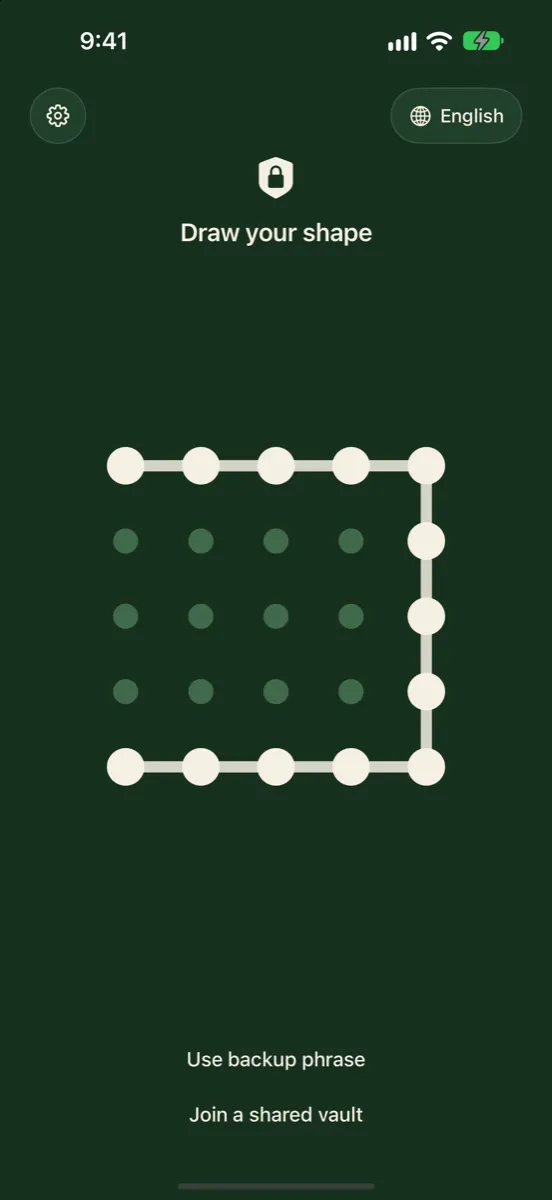
Vaultmira’s free Encrypted iCloud Backup keeps a sealed copy of each vault in your own iCloud. On a new iPhone, sign in to the same Apple Account, install the app and draw the same shape; the vault comes down still encrypted and opens only for your drawing or backup phrase. Get Vaultmira on the App Store.
How it looks in Vaultmira
How Each Method Handles Hidden Photos
| Method | Do hidden photos move? | Good to know |
|---|---|---|
| iCloud Photos | Yes, they download from iCloud | Hidden on one device means hidden on all devices with the same Apple Account |
| Quick Start (wireless) | Yes, with your data | Both phones stay busy for a while; keep them close and plugged in |
| Wired transfer | Yes, with your data | iPhone to iPhone with a suitable USB-C or Lightning cable |
| iCloud Backup restore | Yes, if iCloud Photos was off | If iCloud Photos was on, photos come from iCloud Photos instead |
| Computer backup restore | Yes, if they were in the backup | Made with the Finder, the Apple Devices app or iTunes |
iCloud Photos
If you use iCloud Photos, your whole library lives in iCloud, and Apple says photos you hide on one device are hidden on your other devices too. On the new phone, the library downloads after you sign in, and hidden items appear only in the Hidden collection. Apple notes that photos synced this way aren’t part of your daily iCloud Backup, so stay on Wi-Fi after setup while they finish downloading.
Quick Start and wired transfer
Quick Start sets up the new iPhone from your current one. Apple asks you to keep both devices near each other and plugged in until the transfer finishes, and says the time depends on network conditions and how much data there is. A wired transfer works the same way through a cable. Either way, your photo library, hidden photos included, comes across.
Restoring from a backup
Apple explains that iCloud Backup only covers what isn’t already synced to iCloud. If iCloud Photos was off, the backup may include the photos and videos in your library, hidden ones too. A backup made on a Mac or PC can include them as well. Apple also notes that if you restore an iPhone from a backup of a different kind of device, such as an iPad, photos only come across if you use iCloud Photos.
Open Photos on the new iPhone, tap Collections, then Hidden under Utilities, and unlock it. Check your private photos are there, and check Recently Deleted for anything you meant to keep. Only then erase the old phone.
If you can’t see the Hidden collection at all, the Show Hidden Album setting may be off: Settings → Apps → Photos → Show Hidden Album.
What About Photos Inside a Vault App?
Photos you moved into a vault app are no longer in your Photos library, so iCloud Photos won’t bring them. Whether they reach the new phone depends on the app. Some keep everything on the one device; some use their own account and server; some back up to your iCloud. It is worth checking before you trade in the old phone.
Ask three questions of any vault app:
- Does it have its own backup, and is it turned on? If not, the photos may exist only on the old phone.
- Is the backup encrypted on the phone before it uploads? If not, a readable copy sits on someone’s server.
- What do I need to open it on the new phone? A password, an account, a recovery phrase? Make sure you have it before you start.
Moving Vaultmira to a New iPhone
Vaultmira is built to make this simple without ever leaving a readable copy behind. Every vault can back up to your own private iCloud, already sealed with AES-256-GCM. That backup is free and on by default for new vaults. See Encrypted iCloud Backup.
- On the old iPhone, open each vault and check its Encrypted backup status in Vault Settings. If it says it is waiting for Wi-Fi, connect to Wi-Fi, or tap Back up now.
- On the new iPhone, sign in to the same Apple Account and install Vaultmira from the App Store.
- Draw the same shape you use for the vault. If iCloud holds a vault under that drawing, it comes down to the new phone and opens.
- Forgot the drawing? Tap Use backup phrase, type the vault’s phrase and draw a new shape.
- Repeat for each vault. The app never shows a list of your vaults, so each one is restored with its own drawing or phrase.
Using an iPad as well? With Vaultmira Pro, the same drawing opens the same vault on your iPad through iCloud. See iPhone + iPad Sync.
A vault with backup switched off lives only on the old phone. Move it by turning backup on and letting it finish before you erase the old phone.
If you lose both your drawing and your backup phrase, nobody can open the vault on any phone. There is no Vaultmira account to reset, by design.
Common Problems After Switching
- Hidden collection seems empty. iCloud Photos may still be downloading. Stay on Wi-Fi and plugged in, then check again.
- Hidden collection is missing. Turn on Settings → Apps → Photos → Show Hidden Album.
- Some photos never arrived. Check that the new phone uses the same Apple Account, and look in Recently Deleted. Apple notes photos don’t move from an iPad backup to an iPhone unless you use iCloud Photos.
- A Vaultmira drawing opens an empty vault. That drawing has no backed-up vault behind it. Check you are drawing the exact shape, and that you are online and signed in to the same Apple Account, or use the backup phrase.
Clean Up the Old iPhone
- Confirm everything arrived on the new phone first, including hidden photos and each vault.
- Follow Apple’s steps for selling or trading in: sign out of your Apple Account on the old phone and erase all content and settings.
- If you’re keeping the old phone as a spare, remember its Hidden collection still opens with that phone’s passcode.
For a step-by-step plan, see our scenarios Moving your private files to a new iPhone and Before selling or trading in your iPhone.
Frequently Asked Questions
Will my hidden photos still be hidden on the new iPhone?
Yes. Hiding is saved with your library, so they appear only in the Hidden collection on the new phone too.
I can’t find my hidden photos after switching phones. Where are they?
Check that the Hidden album is shown (Settings → Apps → Photos → Show Hidden Album), that you are signed in to the same Apple Account, and that iCloud Photos has finished downloading. Then look in Collections → Hidden.
Do I need to move Vaultmira with Quick Start?
No. The route we design for is the app’s own encrypted iCloud backup: sign in to the same Apple Account, install Vaultmira and draw your shape. Make sure each vault’s backup is up to date on the old phone first.
Can someone else restore my Vaultmira vault on their phone?
Not without your drawing or backup phrase. The backup sits in your own iCloud, sealed, and opens only with the keys made from those.
What if the old iPhone is already gone?
If iCloud Photos was on, your hidden photos are in iCloud. For Vaultmira, any vault that was backed up can be restored on a new iPhone with your drawing or backup phrase.
Related reading:
- AES-256 Encryption Explained Simply
- End-to-End Encryption for Photos
- What Is Zero-Knowledge Encryption?
Keep it private, for real
Hidden is not the same as locked. Vaultmira seals your photos and files on your iPhone behind a shape only you know.
Download Vaultmira Free