

End-to-End Encryption for Photos: What It Means and Where You Get It
“Encrypted” and “end-to-end encrypted” sound alike, but they answer different questions. For private photos, the difference decides who could ever open them.
Almost every app says your data is encrypted. That is a good start, but it doesn’t tell you who holds the key. If a company encrypts your photos with a key it keeps, it can decrypt them when it needs to, for account recovery, a court order, or because someone broke into its systems.
End-to-end encryption changes who holds the key. The privacy group EFF describes it simply: information is turned into a secret message by its sender and decoded only by its final recipient. For photos you store for yourself, both ends are you.
Sealed on your phone, everywhere it goes: Vaultmira
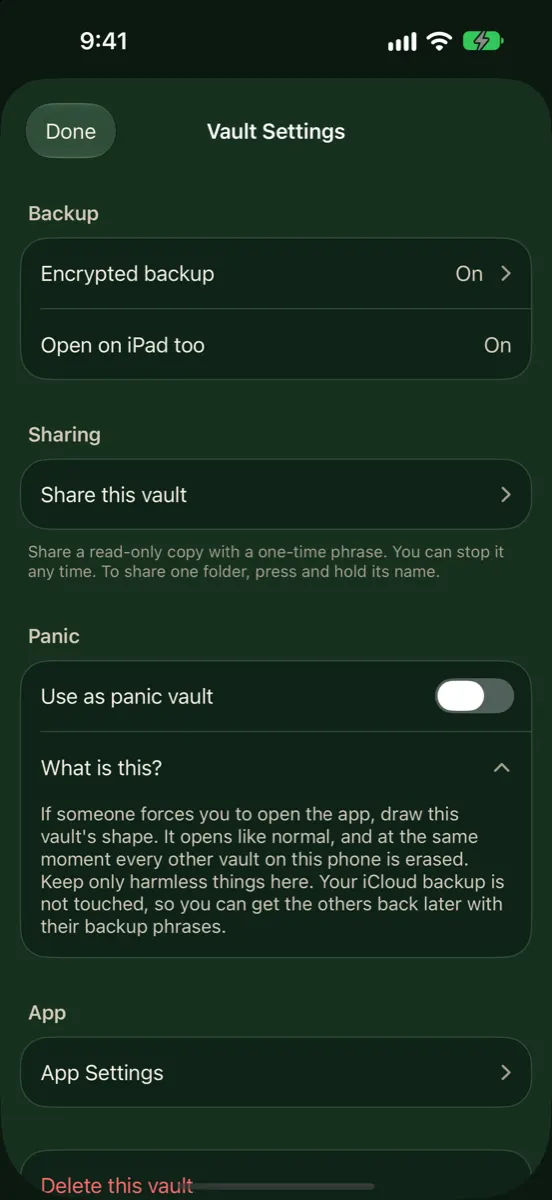
Vaultmira encrypts each photo on your iPhone with AES-256-GCM before it is saved, and its free Encrypted iCloud Backup uploads only those sealed files to your private iCloud. Your keys come from a shape you draw and a backup phrase that only you know. Get Vaultmira on the App Store.
How it looks in Vaultmira
Three Kinds of “Encrypted”
| Type | What it protects | Who can read your photo |
|---|---|---|
| In transit | The trip between your phone and a server | The service, once it arrives |
| At rest, provider-held key | The stored copy, against outsiders who steal disks | The service, whenever it uses its key |
| End-to-end | The photo everywhere outside your devices | Only devices that hold your key |
Most cloud services use the first two together. That is real protection against outsiders. But the service itself can still open your files, and so can anyone who can make the service do so.
Where iPhone Photos Are End-to-End Encrypted
On the iPhone itself
Your iPhone’s storage is encrypted and tied to your passcode, so a powered-off phone is hard to read. But once the phone is unlocked, Photos opens for whoever is holding it, Hidden album included, after a Face ID or passcode check.
In iCloud Photos
Apple offers two settings. Under standard data protection, the default, iCloud data is encrypted and Apple keeps the keys in its data centers so it can help with recovery. Photos is in this group. Under Advanced Data Protection, an optional setting, Photos becomes end-to-end encrypted along with iCloud Backup, iCloud Drive, Notes and more. Apple’s overview says this raises the number of end-to-end encrypted categories from 15 to 25.
Shared Albums in Photos and sharing with “anyone with the link” do not support Advanced Data Protection, according to Apple. iCloud Shared Photo Library stays end-to-end encrypted only if every participant has Advanced Data Protection on.
Apple says some metadata, such as modification dates and checksums of photo data, stays under standard protection even with Advanced Data Protection on. And Apple says it can no longer offer the setting to new users in the United Kingdom.
When you send photos
How a photo is protected when you send it depends on the app you send it with. AirDrop uses an encrypted connection directly between the two devices. Other apps vary, so check their own documentation. And once a photo arrives, the person who received it can save, forward or screenshot it; no encryption can stop that.
End-to-End Isn’t the Whole Story
End-to-end encryption guards the copy in the cloud. It doesn’t help with the most common real-life risks to private photos:
- Someone who knows your passcode. A partner, a family member, or a person who watched you type it.
- A phone handed over unlocked. To show a photo, to a child for a game, or to a repair desk.
- Pressure to open things. When someone insists you unlock your phone and open an app.
- Metadata. EFF notes that even end-to-end encrypted services may still see some details, like when something was sent.
That is why a separate, encrypted vault with its own key, different from your iPhone passcode, can be worth having even if you already use Advanced Data Protection.
Three Everyday Examples
A data breach at the cloud end
If someone broke into a storage provider, provider-held keys could put readable photos at risk. With end-to-end encryption, the stolen copies are scrambled data with no key attached. Apple describes Advanced Data Protection as keeping data secure even in the case of a data breach in the cloud.
A lost phone
End-to-end encryption in the cloud doesn’t change much here. What protects you is your iPhone passcode and, for the most private photos, a vault with its own separate key. A good backup means you get your photos back on the next phone.
Someone who knows your passcode
This is where cloud encryption can’t help at all, because the person opens Photos on your own phone. Only a separate lock, one they don’t know, keeps a photo private from them.
How Vaultmira Keeps Photos Sealed End to End
Vaultmira has no Vaultmira server and no account, so there is no middle party to trust. The two “ends” are your own devices, and iCloud is just the storage in between.
- Your key, from your drawing. A shape on a 5×5 grid, stretched with PBKDF2-HMAC-SHA256 at 600,000 rounds, unlocks the vault’s random master key. See Drawing Encryption.
- Sealed before saving. Photos, videos, previews, the file list and folder names are sealed with AES-256-GCM on the phone.
- Sealed before uploading. The free Encrypted iCloud Backup uploads files that are already sealed, whatever your iCloud setting.
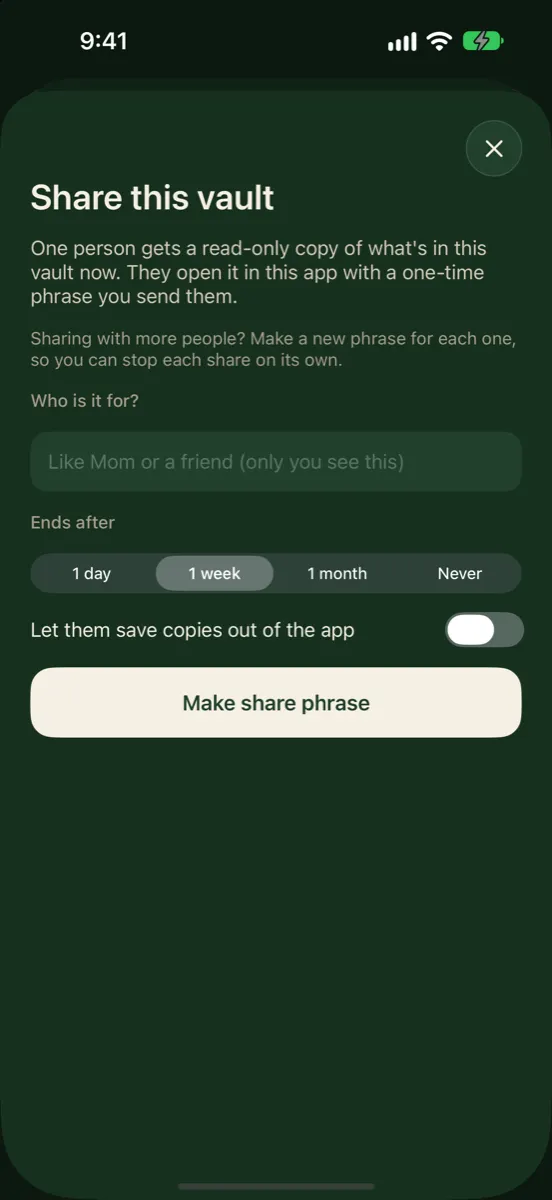
- Sealed when shared. With Secure Sharing (Pro to create, free to open), files are sealed on your phone and opened only with a one-time phrase you pass on. Saving copies out of the app is off unless you allow it, and you can stop a share any time.
Protection for the moments encryption can’t cover
- Screenshots and screen recordings of the app come out black (the backup-phrase page is the one exception, so you can save it).
- Each drawing opens its own vault, and the app never lists them, so you can keep a hidden vault behind a different shape.
- With Pro, a panic drawing opens a harmless vault and erases the others on that device; iCloud copies are kept.
True end-to-end encryption means nobody can reset it for you. If you lose both your drawing and your backup phrase, the vault cannot be opened by you, by Apple, or by us. Save the phrase somewhere safe when you create a vault.
Questions to Ask Any Photo App
- Is the photo encrypted on my device before it is saved or uploaded?
- Does the company ever hold my key, or a way to reset it?
- Are previews, file names and the file list encrypted too, or only the files?
- If I forget my password, what happens? (If “we email you a reset,” the company can get in.)
- Can I stop a share after I send it, and does the other person get a copy they can keep?
Frequently Asked Questions
Is iCloud Photos end-to-end encrypted?
Only if you turn on Advanced Data Protection. Under the default standard data protection, iCloud Photos is encrypted but Apple holds the keys.
If I turn on Advanced Data Protection, do I still need a vault app?
It depends on your worry. Advanced Data Protection protects the iCloud copy. A vault with its own key protects photos on the phone itself, from people who know or can get past your passcode.
Is Vaultmira end-to-end encrypted?
Your files are encrypted on your device and only your devices, with your drawing or phrase, can open them. iCloud stores sealed data, and there is no Vaultmira server in between.
Can end-to-end encrypted photos be recovered if I forget my password?
Only through a recovery method you set up yourself, such as Apple’s Recovery Key or Vaultmira’s backup phrase. That is the price of nobody else holding the key.
Are shared photos still end-to-end encrypted?
It depends on the method. Apple says Shared Albums don’t support Advanced Data Protection. Vaultmira shares are sealed on your phone and opened only with the share phrase.
Related reading:
- What Is Zero-Knowledge Encryption?
- Photo Metadata (EXIF and Location) on iPhone
- Hide Photos from Memories and Featured Photos
Keep it private, for real
Hidden is not the same as locked. Vaultmira seals your photos and files on your iPhone behind a shape only you know.
Download Vaultmira Free