

What Is Zero-Knowledge Encryption?
“Zero-knowledge” is a popular promise in privacy apps. Done right, it means the company truly cannot read your files. Here is how to tell whether an app means it, and what it costs you.
In cryptography, a “zero-knowledge proof” is a precise idea: proving you know something without revealing it. In apps, the phrase is used more loosely. It describes a design where the company has zero knowledge of your content because it never gets the key to unlock it.
That is a strong and useful design. But because the phrase isn’t a formal standard for apps, anyone can print it on a website. The useful skill is knowing which questions reveal whether the design is real.
Zero-knowledge by design: Vaultmira
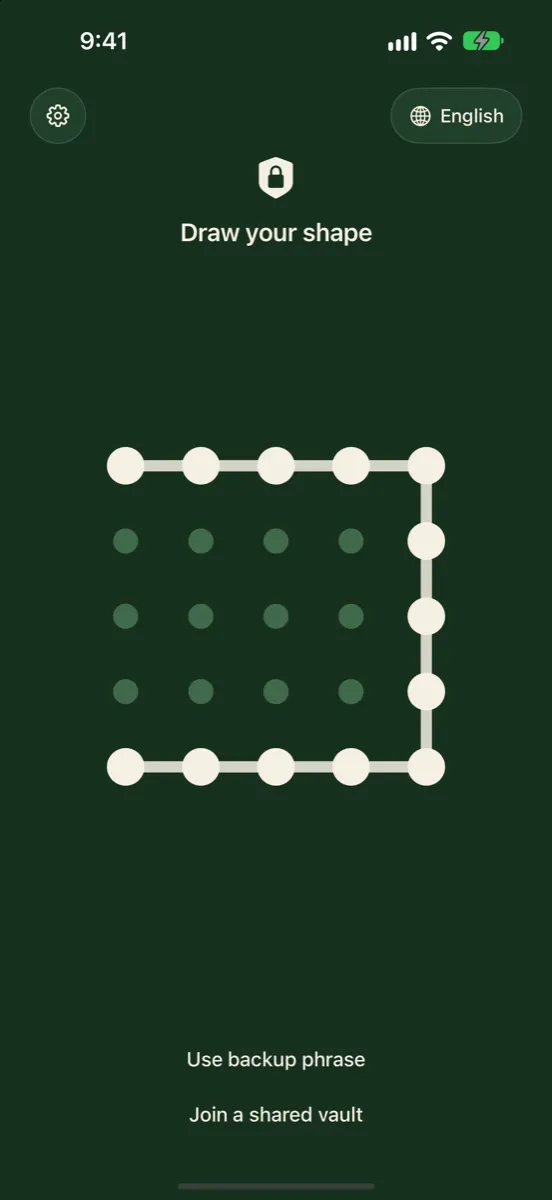
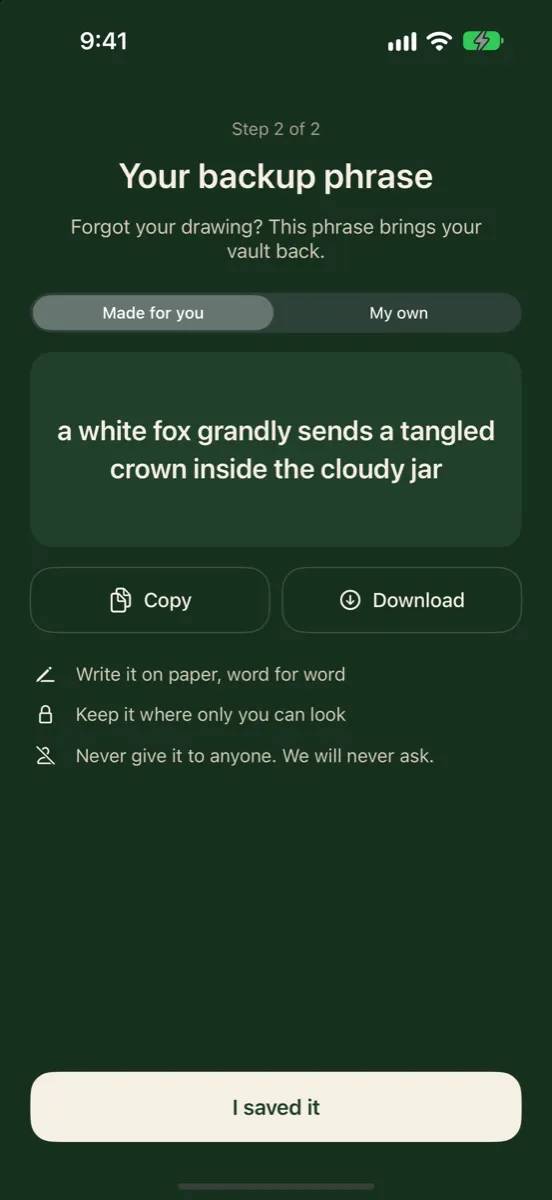
Vaultmira has no account, no email and no Vaultmira server for your files. Your keys are made on your iPhone from a shape you draw and a backup phrase, and your files are sealed with AES-256-GCM before they are saved or backed up to your own iCloud. We can’t read your vault, and we can’t reset it. Get Vaultmira on the App Store.
How it looks in Vaultmira
How Zero-Knowledge Encryption Works
The idea rests on one rule: the key is made where you are, and stays there. A typical design has four parts:
- Your secret. A password, a phrase, or in Vaultmira’s case a shape you draw.
- A slow key function. Your secret is turned into a key with a deliberately slow, salted function such as PBKDF2, so each guess costs real computing time. NIST describes this method in SP 800-132.
- A random data key. Your files are usually encrypted with a random key, which is itself locked by the key made from your secret. This lets you change your password without re-encrypting everything.
- Encryption on the device. Files are sealed before they leave your hands. The company only ever stores or forwards sealed data.
The two overlap. End-to-end describes the path: sealed on one device, opened on another, unreadable in between. Zero-knowledge describes the company: it never holds a key that opens your data. A good private storage app is both.
How to Test the Claim
You don’t need to read code to spot a weak claim. Ask these questions of any app:
| Question | Answer that fits zero-knowledge | Answer that doesn’t |
|---|---|---|
| What if I forget my password? | Use your recovery phrase or key; otherwise it’s gone | We’ll email you a reset link |
| Do I need an account with you? | No, or the account never sees your key | Yes, and the account unlocks your files |
| Can you see my files on your server? | We store only sealed data, or no server at all | We can, but we promise not to look |
| Are thumbnails and file names encrypted? | Yes, everything is sealed | Only the full-size files |
| Does support ever ask for my password? | Never; it wouldn’t help | Sometimes, to fix problems |
The first question is the quickest test. If a company can restore your access with nothing but your email address, it holds a way into your data, and so does anyone who takes over your email.
Words That Sound Similar but Promise Less
Privacy pages use many reassuring words. Here is what each one usually guarantees on its own:
| Phrase | What it usually means | Can the company read your files? |
|---|---|---|
| “Secure” | Some protection is in place | Unclear; ask |
| “Encrypted in transit” | Protected on the way to the server | Yes, on arrival |
| “Encrypted at rest” | Stored scrambled on the server | Yes, it holds the key |
| “End-to-end encrypted” | Sealed on your device, opened on your devices | No, if done properly |
| “Zero-knowledge” | The company never has your key | No, if done properly |
The last two are the ones that keep the company itself out. Even then, check the details: what is encrypted, how the key is made, and what happens when you forget your password.
What Even a Careful App Still Learns
Zero knowledge of your content doesn’t mean zero knowledge of everything. Storage providers usually see how much space you use and when things change. The privacy group EFF makes the same point about end-to-end encrypted services in general: they may still collect some metadata, such as timing. Apple says that even with Advanced Data Protection on, some iCloud metadata, such as modification dates and checksums, stays under standard protection.
A good app keeps that list as short as possible and tells you what is on it.
How Vaultmira Applies It
We built Vaultmira so that there is simply nothing for us to know:
- No account, no email. You never sign up with us. Your Apple Account handles iCloud storage, and App Store purchases go through Apple.
- No Vaultmira server for your files. Vaults live on your devices, with an optional backup in your own private iCloud.
- Keys made on your iPhone. Your drawing goes through PBKDF2-HMAC-SHA256 at 600,000 rounds with a salt. The result unlocks a random master key for that vault. See Drawing Encryption.
- Everything sealed. Files, previews, the file list, folder names and even the stored backup phrase are sealed with AES-256-GCM.
- No analytics. The app collects no usage data and no crash reports.
What iCloud can see
Our Encrypted iCloud Backup stores sealed records under random names in your own iCloud. Like any storage, iCloud can see that your account uses some space and when records change. It cannot see your photos, their names, their previews or how they are organised.
And on the phone
One honest note: zero-knowledge is about us and the cloud. On your iPhone, the app’s files are sealed, but someone who copies the app’s files off an unlocked phone with special tools could count how many vault folders exist. They still could not open any of them.
And when you share
Sharing is where many private apps quietly hand a key to their own servers. In Vaultmira, Secure Sharing (Pro to create, free to open) seals the shared files on your iPhone with a key made from a one-time phrase. The files travel through iCloud under an id that only the phrase leads to. You pass the phrase on yourself, by any route you trust, and you can stop the share at any time. We never see the phrase or the files.
The Trade-Off: Your Recovery Is Your Job
If the company can’t read your data, it can’t rescue it either. Vaultmira gives you a second key you control: a backup phrase, either 9 random words made for you or your own phrase of 6 or more words. If you forget your drawing, the phrase opens the vault and you draw a new shape.
- Write the phrase down, or save it in a password manager you trust.
- Don’t keep it only in the same phone as the vault.
- You can view it again in Vault Settings while the vault is open.
If both the drawing and the phrase are lost, the vault cannot be opened by anyone. That isn’t a gap in the design. It is the design. Choosing a phrase you will still remember in five years, and storing it away from the phone, is the single most useful thing you can do.
Frequently Asked Questions
Is zero-knowledge encryption the same as end-to-end encryption?
They overlap. End-to-end is about data being sealed between devices; zero-knowledge is about the company never holding a key. A private vault should be both.
Can a zero-knowledge company hand my files to someone else?
It can only hand over what it has. If it stores only sealed data and never had your key, what it hands over is unreadable. Vaultmira has no server holding your files at all.
Why can’t Vaultmira reset my drawing?
Because we never have it, or any key made from it. A reset path for you would be a way in for anyone. Use your backup phrase instead.
Does zero-knowledge mean nobody can ever see my photos?
No. Anyone who sees your screen while a vault is open, or who learns your drawing, can see them. Vaultmira adds black screenshots, an option to hide the drawing line, hidden vaults and a panic drawing for those moments.
How do I know an app is really zero-knowledge?
Ask what happens if you forget your password. If the answer is an email reset, the company holds a way in.
Related reading:
- Photo Metadata (EXIF and Location) on iPhone
- Hide Photos from Memories and Featured Photos
- Does Deleting a Vault App Delete Your Photos?
Keep it private, for real
Hidden is not the same as locked. Vaultmira seals your photos and files on your iPhone behind a shape only you know.
Download Vaultmira Free