

Forgot Your Photo Vault Password or Drawing? Here’s What to Do
That sinking feeling when the code doesn’t work is awful. Take a breath: in most cases there is a way back. The steps depend on which app you use, so start below with what to try first.
Forgetting a vault code is common. You set it months ago, you open the vault rarely, or you changed it once and the old one keeps coming back to mind. With drawings, a shape you used to draw without thinking can suddenly feel unfamiliar.
This guide starts with calm first steps that work for any app, then explains recovery in Vaultmira in detail, then what other vault apps say about their own recovery, and finally how to make sure it never happens again.
Recovery that doesn’t need an account: Vaultmira
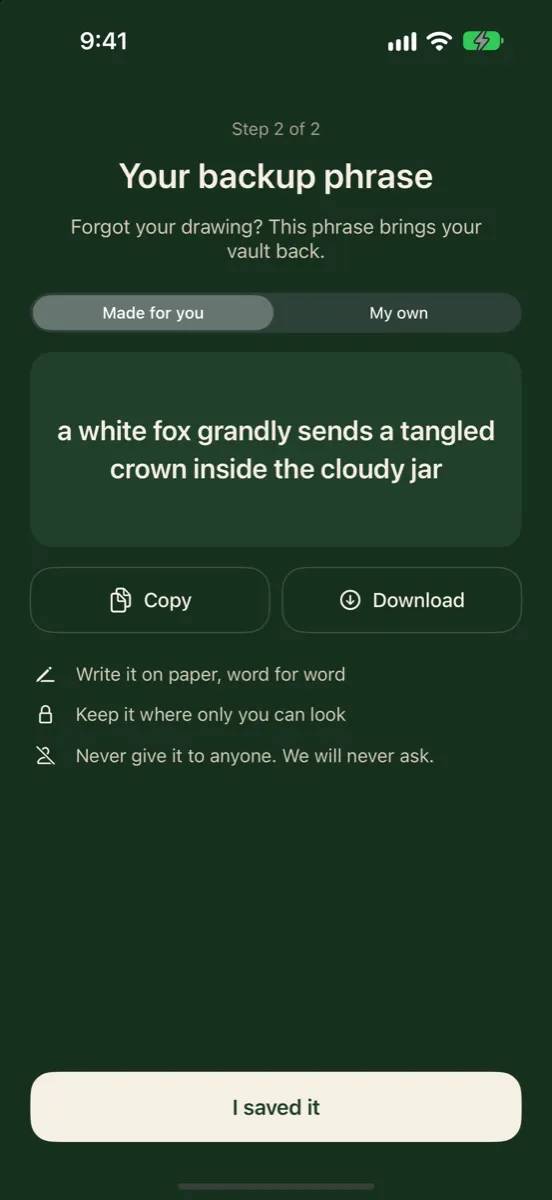
Every Vaultmira vault has its own backup phrase, made for you as 9 random words or written by you (6+ words). It opens a separate sealed copy of the vault’s key, so you can set a new drawing on the same phone or a new one, without an email, an account or anyone else holding a key.
How it looks in Vaultmira
First: What Not to Do
- Don’t delete the app. In most vault apps, deleting the app deletes the files stored inside it on that phone. If there is no backup, they are gone.
- Don’t erase or reset the iPhone to “start fresh.” That removes app data too.
- Don’t pay strangers who promise to crack a vault. A well-built vault can’t be opened without its key, and handing your phone or files to someone else is a privacy risk of its own.
- Don’t rush. Wrong guesses can trigger lockouts or alarms in some apps. Read the app’s help page first.
Second: Try to Remember Calmly
Memory works better relaxed than under pressure. A few tricks help, especially for drawings:
- Use the same hand and grip you normally use. Drawings live partly in muscle memory.
- Think about where you start. Most people begin in a corner or the middle and repeat that habit.
- Try earlier versions. If you changed your code or drawing, the old one may be what you are remembering.
- Step away. Try again later, when you are not thinking about it.
Each drawing opens its own vault. A shape that isn’t one of your vaults simply opens an empty vault, with no error and no damage to your real one. So trying shapes doesn’t erase anything.
One exception: if you set up a panic drawing (Pro), drawing that particular shape erases your other vaults from this device. Their iCloud copies are kept, and drawing a real shape later on an online device brings that vault back from iCloud. Still, avoid your panic shape while guessing.
Recovering a Vaultmira Vault With Its Backup Phrase
Vaultmira has no account and no reset email. Instead, every vault has a backup phrase, shown when you made the vault and saved by you. It is a second key that opens the same vault.
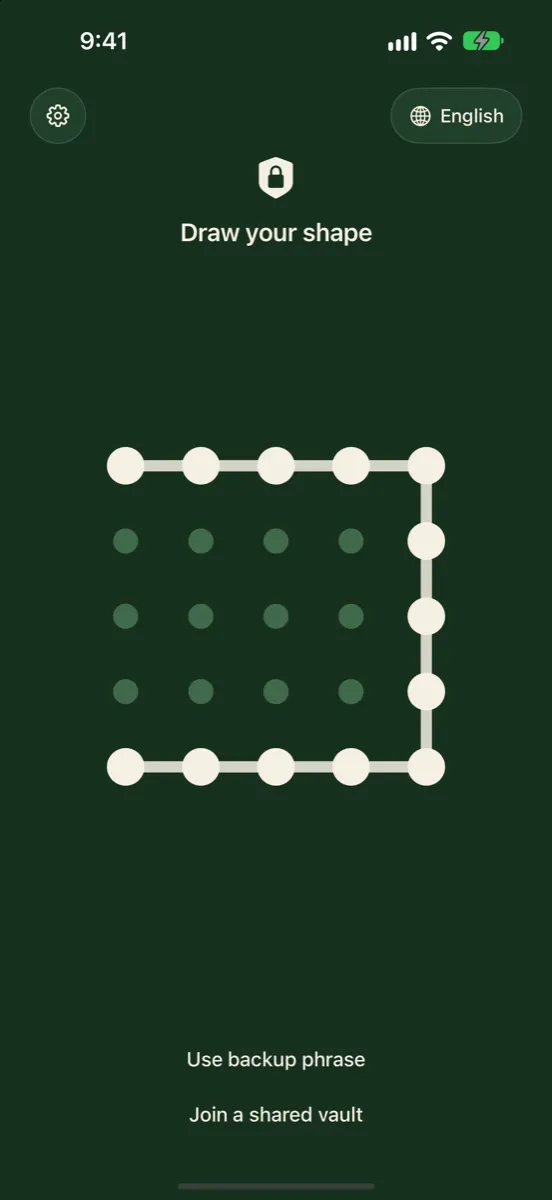
Step 1: Tap “Use backup phrase”
It is on the draw screen, under the grid. You don’t need to draw anything first.
Step 2: Type the phrase
Type it word for word, in order. Capital letters and commas don’t matter, and in a phrase made for you the little words “a”, “an” and “the” are ignored. Tap Find my vault.
Step 3: Draw a new shape
When Vaultmira shows Vault found, draw a new shape (at least 6 dots and one turn) and draw it again to confirm. Your old drawing stops working; your phrase stays the same. Your files are untouched: only the small sealed copy of the vault key changes.
On a new or reset iPhone
Sign in to the same Apple Account, install Vaultmira, tap Use backup phrase and type it. If that vault was backed up with Encrypted iCloud Backup (free, on by default), the phrase finds it in your private iCloud and brings it down. If backup was off for that vault and the old phone is gone, there is no copy for the phrase to find.
If You Forgot the Phrase but Can Still Open the Vault
Good news: you can see it again. Open the vault with its drawing, go to Vault Settings, and look under Backup phrase:
- See backup phrase shows the current one.
- Make a new backup phrase gives you a fresh one; the old one stops working.
- Use my own phrase lets you type one you will remember (6+ words).
If You Forgot Both the Drawing and the Phrase
We’ll be straightforward: then that vault can’t be opened, by you, by Apple or by us. Vaultmira never receives your drawing or phrase, and there is no master key or back door. That is the price of a vault nobody else can open. Your other vaults are not affected, and you can keep using the app with a new drawing.
Recovery in Other Vault Apps
Every app handles this differently. Here is what makers say on their own pages, as of November 2026. Always follow the maker’s current help page.
| App | What the maker describes |
|---|---|
| Keepsafe | Tap Forgot PIN; an access code goes to your verified email addresses |
| Private Photo Vault | A recovery email, if you set one up, can recover the app or album password; the Cloud Vault password can’t be recovered |
| Calculator# | Lost-password recovery through your registered email |
| Hide it Pro | Lists a Password Reset in-app purchase |
| Apple Hidden album | Opens with your iPhone passcode, Face ID or Touch ID |
| Apple Notes (own password) | Apple can’t help recover a forgotten Notes password |
If you forgot your iPhone passcode rather than a vault code, Apple’s options start with Passcode Reset, which lets you use your old passcode within 72 hours of changing it. Beyond that, resetting the device erases it, so app data comes back only from backups.
Why a Vault Can’t Simply “Reset” Your Code
It can feel unfair that a company can’t just let you back in. The reason is how encryption works. In a vault like Vaultmira, your drawing isn’t checked against a stored copy; it is turned into the key that unlocks your files. If the company could make that key without you, so could anyone who stole its records or pressured it to.
That’s why recovery always needs a second secret that you hold: a recovery key, a phrase, or an email account you control. Each choice moves the trust somewhere different. Vaultmira keeps it entirely with you, through the backup phrase.
Make Sure It Doesn’t Happen Again
- Save the phrase in two places. A password manager and a paper copy somewhere private is a good pair. Vaultmira’s phrase page has Copy and Download buttons, and screenshots are allowed on that one page.
- Open each vault now and then. Regular use keeps a drawing in muscle memory.
- Keep backup on. Without a backup, a phrase can’t rescue a vault from a lost phone.
- Pick a shape you can rebuild. Something with a meaning only you know is easier to recall than a random scribble, but avoid letters or initials others could guess.
For the bigger picture on keys and recovery, see How photo vault apps work.
Frequently Asked Questions
Can Vaultmira reset my drawing for me?
No. There is no account and Vaultmira never receives your drawing, so there is nothing to reset from our side. The vault’s backup phrase is the way back in.
I drew my shape and the vault is empty. Did I lose everything?
Almost certainly not. A shape that isn’t one of your vaults opens a new, empty vault. Your real vault is untouched. Try again calmly, or use the backup phrase.
Does recovering with the phrase change my files?
No. Your files stay sealed exactly as they were. Only the small sealed copy of the vault key that your drawing opens is replaced.
Can I recover a vault if I deleted the app?
Yes, if Encrypted iCloud Backup was on for that vault. Reinstall Vaultmira with the same Apple Account, then draw your shape or use the backup phrase. Without a backup, the files were removed with the app.
Is a recovery email safer than a phrase?
It is more convenient, but it makes your email account part of your vault’s security. A phrase only you hold keeps the company and your inbox out of it. Each has a trade-off.
Does Vaultmira lock me out after wrong drawings?
A wrong drawing just opens an empty vault, so there is nothing to lock you out of. Your real vault waits for its own shape.
Related reading:
Keep it private, for real
Hidden is not the same as locked. Vaultmira seals your photos and files on your iPhone behind a shape only you know.
Download Vaultmira Free